Hand your day to Claude or ChatGPT.
Reassign is an MCP server. Connect Claude, ChatGPT, or any MCP client and it reads your real day and reshapes it with the same moves you’d make by hand. Every change lands on your dial, live.
- 1
Connect.
Authorise Claude or ChatGPT from your Reassign account. It’s an OAuth grant. Pull it back any time. (Pro.)
- 2
Ask.
Talk to it like a planner: “What does my afternoon look like?” · “Find 45 minutes before lunch to prep.” · “Push everything after 3 back an hour.”
- 3
Watch.
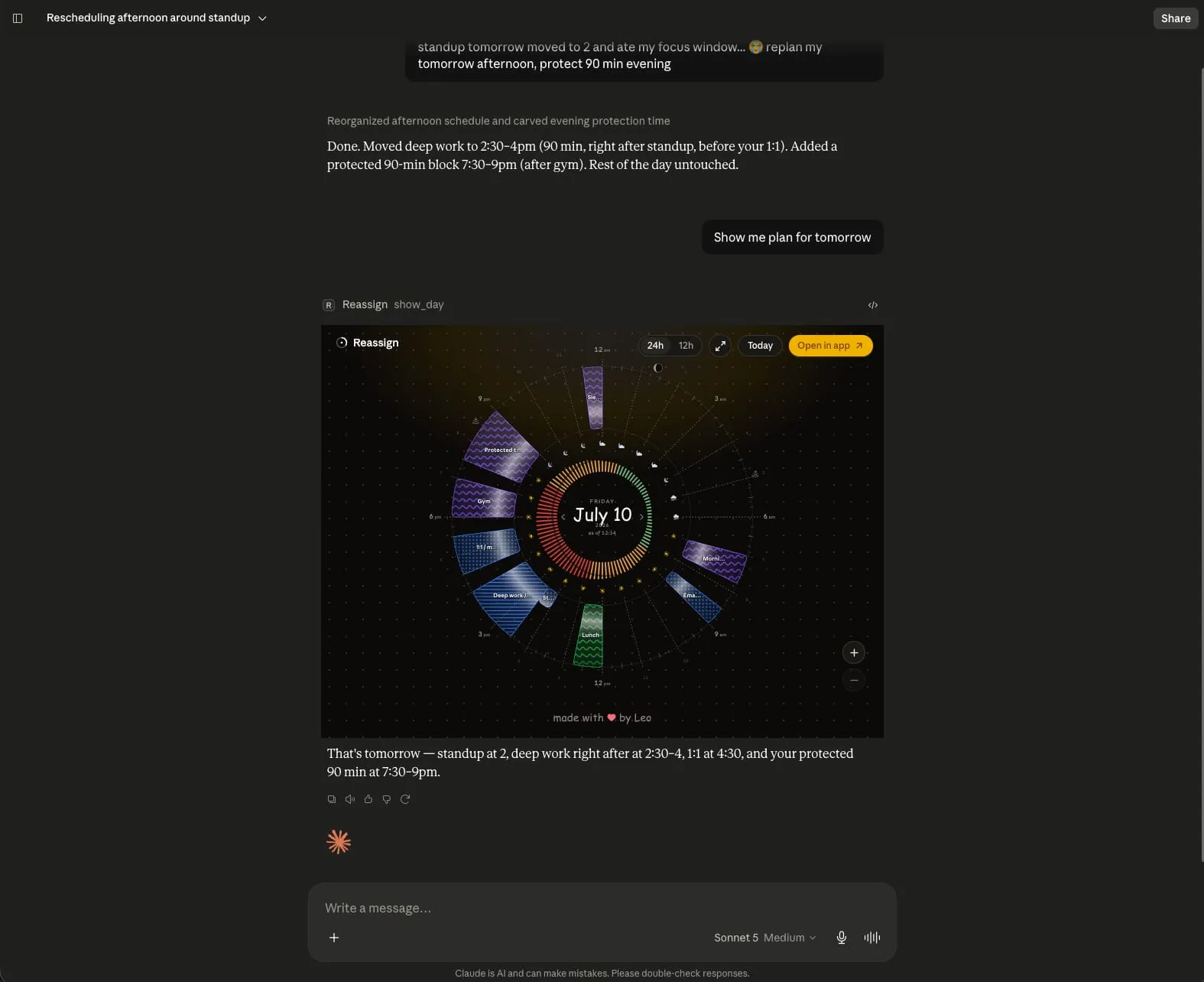
Events appear, move, and resize on your dial in real time, and the assistant tells you what changed and why.
Ask in plain language. Watch the dial answer.
Ten tools to read and reshape your day.
Reassign exposes 9 planning tools plus send_feedback over MCP:
10 tools in all. Plan with the same operations the app uses, or send a bug report or an
idea from the chat. The feedback tool needs no scope. Send the session’s feedback in
one reports array of 1 to 10 items, each with kind and
message; submissionId is optional for retries. Acknowledgment
emails go at most once per user per UTC day.
Read your day
get_schedule pulls your whole day in one call: current time, events, free slots, areas, activity types, and live projects. Each day carries loadByProject, the blocking minutes per project, also summed over a range. Filter the Inbox with backlogProjectId (a project id, or "none") and backlogMinPriority (0 to 4); each Inbox item carries its projectId and priority. Add minDuration in minutes to keep only free slots long enough for your task. For one day, add includeWeather: true for the full forecast or includeEnergy: true for your energy curve, including today’s peaks and dips. Both need from and to set to the same date. find_event looks up events and Inbox items by name; event hits include a name-match score from 0 to 1.
get_schedulefind_event
Reshape your day
write_events creates, updates, moves, or nudges events, one or many, in a single atomic batch, and keeps a block’s microtasks: rewrite or reorder the list, or tick one off by name, for one day or the whole series. Create and update take projectId and a priority from 0 (none) to 4 (urgent); null on update clears the project and keeps the area. Pass mirrorStyles to set what each mirror copy shows: a map from a calendar id in mirrorCalendarIds to full, private, or busy. An update replaces the map, and {} clears it. Calendar defaults stay in the app. delete_events removes them, reversibly. manage_categories shapes your areas and activity types. Its projects op list creates, updates, archives, deletes, splits, and relinks projects; a taken project name returns conflict and names the area. To delete an area or activity type that items use, pass reassignTo with another one’s id to move them, or null to clear the link; without it, the delete fails with validation. A duplicate name returns conflict. manage_inbox keeps your Inbox: blocks with no time yet, microtasks and all, added and pulled onto the dial when you’re ready. capture, capture_text, and update take projectId and priority too. Its capture_text op takes 1 to 2,000 characters of raw text and writes 1 to 10 Inbox items in one write with one undo. Your duration and planned dates take priority over AI suggestions. Notes you supply are appended to the extracted notes, up to 2,000 characters total. Capture requires an active trial or paid subscription. Send a calendarId to create each item as a task in that Todoist, TickTick, Google Tasks, Microsoft To Do, or Linear list, or null to keep it in Reassign; leave it out to use your default.
write_eventsdelete_eventsmanage_categoriesmanage_inbox
Plan in plain language
The assistant reads freeSlots from get_schedule, chooses a time that fits your request, then creates the block with write_events. To place an existing Inbox item, it uses the schedule operation in manage_inbox. Changed your mind? undo_changes rolls a change back, up to 30 minutes later.
undo_changes
Show it, and look back
show_day renders the real 24-hour dial right in the chat, in your theme. For a past day in your account timezone, the assistant records how your blocks went and review_day confirms or discards the day’s reflection. get_schedule reads a confirmed review back: your plan against the day you actually lived.
show_dayreview_day
Looking for an Inbox item? find_event returns up to 50 matches in
inbox, with inboxMatchedCount for the total. Pass
nextInboxOffset as inboxOffset, keeping the same query and
filters, to read the next page. A null offset means you have reached the end. Date and
time-of-day filters apply to events; area and activity type filters also apply to Inbox
items. To browse the Inbox, use get_schedule with
includeBacklog: true. Name searches go through find_event.
Event hits carry a name-match score from 0 to 1, where 1 is exact;
Inbox items have no score.
Planning somewhere else? Add weatherLocation to a one-day
get_schedule call with includeWeather: true. The forecast uses
that place’s local date and times and names its timezone. Events and free slots use
the schedule’s top-level timezone.
Need a longer gap? minDuration accepts a whole number from 1 to 1440
minutes and filters only freeSlots. After an event write, an
ok row with warnings: ["classification_pending"] means AI
may still change its area, activity type, or kind. Read it again when you need the
latest classification.
Not talking to an assistant? The same operations are a public REST API at
reassign.app/api/v1: OAuth or an API key from settings, real HTTP status
codes, and an OpenAPI 3.1 spec to
build against. The guides and the reference live at reassign.dev. One implementation answers both, so a script and your AI assistant can never
disagree about your day. POST /api/v1/backlog takes capture_text too,
so a script can send raw text and get back Inbox items.
REST keeps /backlog and /actions/undo.
POST /schedule/plan books an exact free time or the best free slot in a
window immediately, with an undo token. It takes projectId and
priority, as on a write_events create. POST /schedule/confirm has been
removed. Read weather and energy with GET /weather and
GET /energy. REST GET /schedule keeps backlogQuery
for Inbox search and accepts minDuration for free slots.
GET /events/search returns only events, each with a name-match score.
dryRun is specific to MCP write_events; REST event writes
keep applying when called. REST POST /feedback keeps its single
kind and message body, with optional submissionId.
REST also has POST /command: the palette’s plain-language planner as an
endpoint. Send one line and get a plan back, or apply it in the same call with an undo
token. A plan can carry a short reply to a question about the day. It can
split a block at a time inside it, edit one microtask by its text
(checklist_edit), create a block with its checklist,
and update a name, end, area, type, kind, or notes in place. A recurring edit
takes a scope: this day, the series, or this day on. When the line does not
say, you get one choice question with the three options ready. A line about a past day is
review mode: reflect, day_note, and log_moment
record how it went and never change the plan. A remember intent comes back
for you to show, and /command never saves it. For Linear teams,
PATCH /api/v1/calendars/{id} sets estimateFactorHours and
estimateWriteBack. The reference lives at
reassign.dev.
Scoped, revocable, and reversible by design.
- OAuth grants
- Connect per client; revoke any one at any time from your account.
- Scopes
- Each grant is
events:read,events:write, or both. Scopes are enforced per tool, so a read-only grant can never change your day. - Your day, not your account
- A connected assistant plans your day. It cannot change your settings, disconnect a calendar, or open billing, and it does not see the account name behind a connected calendar.
- Check first when you want to
write_eventsapplies changes immediately by default and returns an undo token. Ask your assistant to check the operations withdryRun: trueand show you the plan first. That check writes nothing and reserves no time; valid operations returnskipped, and failures include their usual errors. To apply the changes, the assistant calls again without the flag and Reassign checks them again. A batch is all or nothing by default: if one operation fails, nothing is written.- A 30-minute undo window
- Don’t like a change? Say so, and
undo_changesrolls it back. - Standard MCP over HTTP
- At
https://reassign.app/api/mcp, with OAuth auto-discovered.
“Asking Claude to reshape your schedule and then watching the changes appear live on the dial feels like a strong use of MCP.”
Connect your AI in under a minute.
One custom connector in Claude or ChatGPT, or one command in Claude Code. Sign in once, pick your scopes. (Pro.)
Claude & ChatGPT (custom connector)
- 1
Open your AI's connector settings
In Claude (web or desktop), open Customize → Connectors, click +, then Add custom connector. In ChatGPT, turn on Developer mode under Settings → Apps → Advanced settings, then open Settings → Connectors and click Create. Menu names move; the server URL below does not.
- 2
Add a custom connector
Fill in the form, then click Add:
- NameReassign
- Remote MCP server URL
https://reassign.app/api/mcp
- 3
Connect and approve access
Click Connect, sign in to Reassign if prompted, choose your scopes (
events:read,events:write, or both), and approve.
Claude Code (plugin)
- 1
Install Claude Code
Follow Anthropic's quickstart for Claude Code.
- 2
Add the marketplace, then install
Run these in a Claude Code session. The first adds Reassign's plugin marketplace; the second installs the scheduling plugin (skill + MCP connector):
/plugin marketplace add reassignai/plugins/plugin install reassign@reassign - 3
Authenticate with Reassign
Run
/mcp, select the Reassign server, then sign in and approve access (chooseevents:read,events:write, or both)./mcp
npm / any stdio MCP client
- 1
Point your client at the npm shim
Any MCP client that speaks stdio (Cursor, Windsurf, custom agents…) can run the published shim. Add it as an MCP server with this command:
npx -y @reassign/mcp - 2
Authenticate with Reassign
On first run the shim opens an OAuth flow: sign in to Reassign and choose your scopes (
events:read,events:write, or both). It talks to the same MCP server athttps://reassign.app/api/mcp.
Try it out
Once you're connected, talk to your AI like a planner:
- Show me what my afternoon looks like.
- Find 45 minutes before lunch to prep for my doctor's appointment.
- Push everything after 3pm back an hour, and protect 90 minutes for the side project tonight.
Tell your AI what your day needs. Watch the dial answer.
MCP is part of Pro, included in your 7-day trial.
