Looking for a Structured alternative
An honest Structured alternative, from someone who built one. Where Structured wins on price and platforms, and where a 24-hour circular planner wins.

First, the bias. Reassign is mine. I built it because my own day kept vanishing into a list, so read everything below with that declared. Everything I say about Structured comes from their own site, help centre and store listings, checked on 30 July 2026 and re-checked on 19 August 2026, and where I could not substantiate something I have said so rather than guessed. Both sides of this page were brought up to date on 19 August 2026, and the re-check changed two things: their free versus Pro article now shows drag and drop free on every platform, and their help centre now lists US prices, both below. Where this page and their own pages disagree, theirs win.
Second, the part most comparison pages skip: Structured is good, and its free tier is unusually generous. Its App Store listing ships in 28 languages, and the app puts the timeline, the inbox, sub-tasks, widgets, Live Activities and a Pomodoro focus timer on the free tier, with drag and drop free on iOS, Android and web. A rival giving away a focus timer we charge for is not a detail I get to leave out. If you are looking for an alternative because you assume there must be something better, there might not be.
The useful question is narrower.
The only question that matters
Which failure mode is yours?
Structured’s shape is a vertical timeline: your day as a clean stack of blocks with icons and colours, running top to bottom, with an inbox holding the things that have no time yet. That shape is very good at one job and, on its own, structurally weak at another.
It is good at the next thing. What is now, what is after now, what is still sitting in the inbox. If your day falls apart because you never wrote the plan down, a fast and pleasant timeline is the right tool and you should probably stay.
It is weak at the whole thing. A line has to scroll, and whatever is off the screen stops existing. You are inside the morning and the evening is abstract. The three-hour gap between two meetings is a subtraction you have to perform rather than a shape you can see. If six o’clock keeps arriving as a surprise, that is time blindness, and a longer or prettier line does not fix it.
What a circular planner does differently
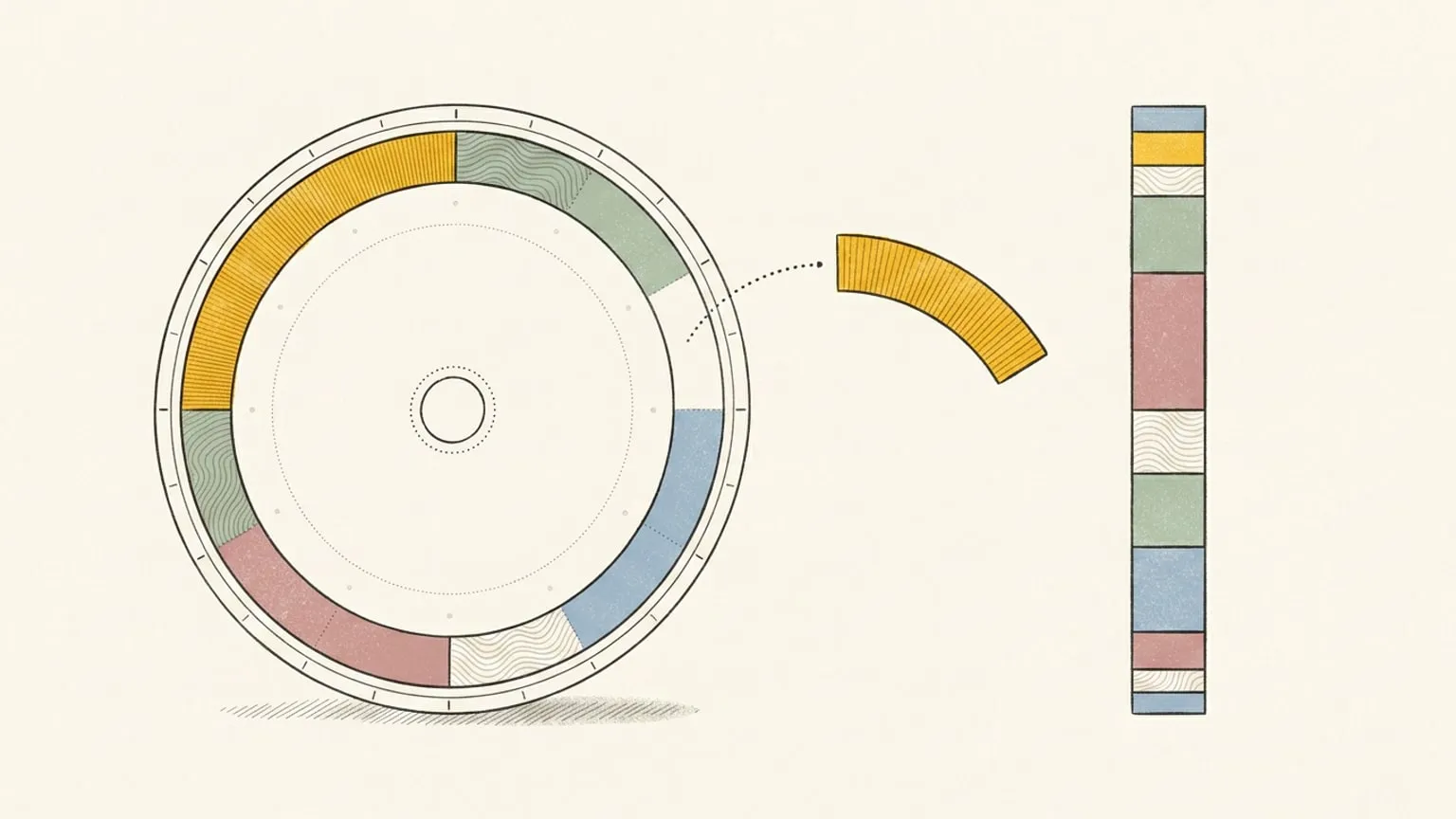
Reassign draws all 24 hours as a single ring. Midnight at the top, noon at the bottom, every block a wedge sized to its real length, and a now indicator sweeping round it. Nothing scrolls out of view, so the evening cannot quietly stop existing while you are busy with the morning.
That is the whole argument, and I am not going to re-run it here. It is set out in full in why a day is drawn round.
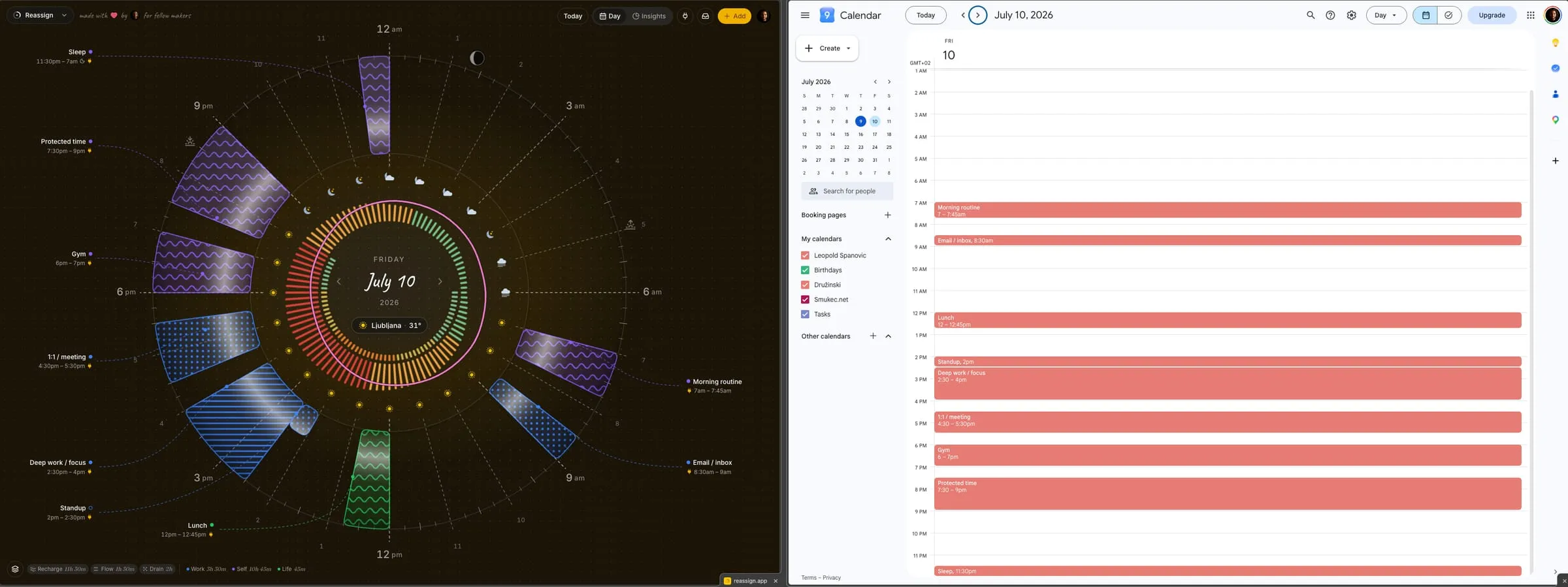
The honest cost of a ring: it shows the whole day at lower detail than a timeline shows a slice of it. Structured’s stack has more room per block for icons, notes and subtasks than a wedge does, and if per-block detail is what you want, that is a point for them.
What Structured actually gives you
Comparison pages get this wrong constantly, so here is only what I could confirm from first-party sources on 30 July 2026, re-checked on 19 August 2026.
Platforms. iPhone, iPad, Mac, Apple Watch, Apple Vision and Apple TV on the App Store listing. Android from the Play Store, needing Android 11 or later. And a browser version at web.structured.app, which requires a Structured Cloud account. There is no native Windows app; their help centre tells Windows users to use the web version.
The free tier. Their free versus Pro article lists as free everywhere: timeline tasks, all-day tasks, inbox tasks, task duplication, subtasks, notes, icons, colour coding, drag and drop, and sync schedule. The rest is platform-dependent: notifications and alerts, widgets, the Energy Monitor, layout and font size on iOS and Android; timeline views on iOS and web; duplicate days and Cycle Season on iOS only. When I first checked, drag and drop was listed for iOS only; by 19 August 2026 it was on all three. That is still a large amount of planner for nothing.
What Pro adds. Structured AI, Calendar Import, Reminders Import, Recurring Tasks, Replan, Custom Notifications, Custom Color Palette and Premium Icons. Not all of those reach every platform: the same article says Android does not yet have Reminders Import or Replan, and the web version carries only four of the eight. Their Android help page also describes that app as still in its early stages of development.
Price. Structured Pro comes as a monthly plan, a yearly plan, or a one-off lifetime purchase, and the price varies by region and currency. When I first wrote this I could not find a figure on a Structured-owned page. On 19 August 2026 I could: their help centre article on Structured Pro, edited 1 June 2026, lists the US prices as US$6.99 a month, US$29.99 a year and US$99.99 for the lifetime purchase, and says the price depends on your region, your currency and the purchasing power of your region. So those are US numbers, and an app store shows you the price for yours; check your own App Store or Google Play listing before you hold me to them. The lifetime option is the part worth knowing about: a one-off purchase is unusual in this category and it changes the maths if you plan to stay for years.
Three real differences
1. The shape
Covered above, and it is the one that actually matters. Everything else is preference.
2. Replanning
Structured ships Replan and Structured AI, both on Pro. Their 4.0 announcement says the AI can create tasks, edit existing tasks in your timeline and inbox, delete them in bulk, and reschedule them. That is a real replanning feature and I am not going to pretend otherwise.
Structured also ships an MCP server, so this is not a difference in kind (the full list of planners with one is short). Their help centre documents connecting ChatGPT, Claude Desktop, Claude Code, Cursor, Google Antigravity, Gemini CLI and OpenCode to read, manage and edit tasks, which is a wider list of documented clients than ours.
Inside the app, the two are closer than they were. Structured AI takes text or voice. Reassign’s Ask AI is a chat in the ⌘K palette (Pro) that takes a typed line, dictation, or a photo of a paper list, answers questions about your plan, and refuses off-topic requests. Its changes arrive as cards you apply. Voice from the dial can skip the cards: safe changes apply at once with one Undo, and deletes and clears go to the palette for review.
The difference is what the agent is holding. Structured’s MCP edits tasks. Reassign’s edits the day: Claude moves and resizes blocks that have real positions on the ring, and every change lands on the dial with an undo token, so rescheduling a whole broken afternoon is one sentence and you can see what it did to the shape of the evening. That is the same shape argument again rather than a separate advantage, and if you do not live in a chat window neither version is worth much to you.
For the people who live in a script instead, Reassign has had a public REST API since August 2026: the same operations as MCP over plain HTTP, with an OpenAPI 3.1 spec, developer docs, an API key from settings, and one implementation shared with MCP so the two cannot disagree about your day. It is Pro, like MCP. I have not checked whether Structured publishes an equivalent, so I am not scoring this one.
3. Calendars
Both of us put calendar work behind the paid tier, so this is not a free-versus-paid difference.
The difference is direction. Structured’s own feature list names theirs Calendar Import and Reminders Import. Reassign’s Google Calendar and Outlook sync is two-way: move or resize a block on the dial and it updates at the source, and Todoist, Google Tasks, Microsoft To Do, Linear and TickTick tasks flow in both directions too. I am reading a feature name rather than testing their sync, so if write-back is load-bearing for you, ask Structured directly before you take my word for it.
Neither of us has streaks
Worth saying, because guilt mechanics are the thing I criticise most loudly elsewhere. Reassign deliberately ships no streaks, badges or trophies. A streak turns a bad week into a debt, and for a brain already carrying shame about executive function, that is the mechanic that makes reopening the app harder than never opening it.
I went looking for a streak counter in Structured and could not find one in their published feature lists, their 4.0 release notes or their store listing. As far as I can tell this is not a difference between us, and I would rather say that than manufacture one. If you are leaving an app that guilts you, both of these are safe places to land.
Where Structured is straightforwardly better
Not a rhetorical section. These are real, and any one of them might settle it for you.
- Native apps, nearly everywhere. iPhone, iPad, Mac, Watch, Vision and Android. Reassign is a web app you can install to your home screen and sync across devices, with internet required to save changes, but there is no App Store build and no watch face. The nearest thing on our side is a Chrome extension that frames today’s dial on every new tab, which answers the desk and not the wrist.
- Languages. Twenty-eight on the App Store listing. Reassign is English only.
- A more generous free tier. Their App Store listing puts the timeline, the inbox, sub-tasks and notes, interactive widgets, Live Activities and a Pomodoro focus timer on the free tier, with drag and drop free on iOS, Android and web. Ours charges for focus intervals. Reassign has no permanent free plan. Its dial, calendars, MCP, focus mode, energy curve, Inbox, list, and timeline are included in Pro. If a free planner is the requirement, choose Structured.
- A lifetime option. You can buy Structured once and be done. Reassign has no lifetime purchase and I am not planning one.
- Cheaper. Structured’s own help centre lists US$6.99 a month or US$29.99 a year, against our $14 a month or $120 a year, and the lifetime purchase is US$99.99. Those are US figures checked on 19 August 2026, and Structured says other regions differ, so check your own store listing for yours.
- Maturity. Years of polish, in 28 languages. Reassign is young.
If two or more of those are load-bearing for you, stay where you are. That is a real answer and I would rather give it than win badly.
Where this one is better
- The whole day at once, which is the entire point.
- Two-way sync rather than import, as above.
- An agent that moves blocks, not tasks. Both apps ship an MCP server; ours hands the agent a day with a shape rather than a list, as above, and the same operations are a public REST API for the things you script rather than say.
- Your day on every new tab. The Chrome extension frames the live dial in every new tab and sends the page you are reading to your plan from a popup, a right-click, or the address bar. Installation is free; opening your plan requires an account with trial or paid access. Structured’s widgets and Live Activities answer the phone; this answers the browser, and I would call it a different surface rather than a better one if the phone is where your day happens.
- A predicted energy curve rather than a manual budget. Structured’s Energy Monitor asks you to rate how costly each task is and totals it into a daily figure, which is a genuinely thoughtful piece of design. Reassign draws a per-hour curve from your bedtime and sleep instead, so energy-based planning tells you when to put the hard block, not only how much you have spent. Since August 2026 that curve can also carry the menstrual cycle, opt-in and off by default, and hedged on purpose because the measured effect is small. Structured lists a Cycle Season feature, free on iOS; I have not used it, so I name it here rather than compare it. Two different tools for one problem. Theirs is free; ours is Pro.
- Reflection. Mark each planned block as happened, changed or did not, or tell Ask AI how the day went and it records the marks and a day note without changing the plan. Then read the day you planned against the day you lived.
All these planner features are included in Pro and the 7-day no-card trial. There is no permanent Free plan. Opening your plan in the Chrome extension also requires an account with trial or paid access.
On price
Reassign has one Pro plan at $14/month or $120/year ($10/month billed yearly), with a 7-day no-card trial. After the trial, a subscription is required to use the planner; your data stays. See plans and transition terms.
I am not going to pretend we are the cheap option. We are not. Every figure Structured publishes comes in under ours, and it sells a lifetime licence on top of that. If price is the deciding factor, the decision is already made and it is not us.
What the difference buys, if you spend it, is the shape of the day and the two-way plumbing around it. That is worth testing for an evening, not taking on faith.
If you were also looking at Tiimo
Different comparison, different failure mode. The Tiimo comparison covers the routines-and-reminders end of this space. Both of them make the line the place you plan, so if the line is where your day makes sense, choosing between them is mostly about price and how much gentle guidance you want along the way. If those two are your shortlist, Tiimo versus Structured, compared sets them side by side on one page.
How to decide in one evening
Do not read more comparisons. Do this instead.
Block tomorrow twice, once in each, boring parts included. Then set an alarm for 3pm, after something has already slipped, and open both. Ask one question of each screen: can you see how much of today is left without counting? Whichever answers it is your shape.
Structured is a good app and a good line, and for most people the line is enough. If yours keeps hiding the second half of the day, that is not a polish problem and no price makes up for it. One evening tells you which of those you have.
Frequently asked
- What is the best Structured alternative?
- It depends which part of Structured stopped working for you. If you want the same vertical timeline with more routine guidance, Tiimo is the closest match. If the timeline itself was the problem, because you keep losing the shape of the whole day, a 24-hour circular planner like Reassign draws all 24 hours as one ring, with a list and a timeline included in Pro for reading the days ahead. Structured puts its timeline views on its free tier, so on that specific comparison they give away what we charge for. If you only wanted it cheaper, an alternative is unlikely to help: Structured has a large free tier and a one-off lifetime option, so very little in this category undercuts it.
- Is Structured free?
- Structured has a substantial free tier; Reassign has no permanent free plan. Structured's App Store listing puts the timeline, the inbox, sub-tasks with notes, colour coding and icons, interactive widgets, Live Activities and a Pomodoro focus timer on the free tier, and their free versus Pro article puts drag and drop on the free tier on iOS, Android and web. Pro adds calendar and Reminders import, recurring tasks, AI day planning, Replan and custom notifications. Reassign charges for focus intervals, so on that specific feature Structured gives away what we sell.
- How much does Structured Pro cost?
- Structured Pro is sold monthly, yearly and as a one-off lifetime purchase, and the price depends on your region and currency. Their help centre lists the US prices as US$6.99 a month, US$29.99 a year and US$99.99 for the lifetime purchase, checked on 19 August 2026, and says other regions differ. Check the App Store or Google Play listing for yours. Reassign offers a 7-day no-card trial, then requires a subscription. If ongoing free access is your priority, Structured is the better fit.
- Does Structured have a web app?
- Yes. Structured runs in a browser at web.structured.app and it needs a Structured Cloud account to sync. Their free versus Pro article notes that the web version carries fewer Pro features than iOS does. There is no native Windows app; their help centre points Windows users at the web version.
- What is the difference between a circular planner and a timeline?
- A timeline draws your day as a vertical strip, so duration is to scale but position in the whole day is not visible and anything off the screen stops existing. A circular planner draws all 24 hours as one closed ring, so the morning, the evening and the gap between them are a single object you can see at a glance. Each shows something the other cannot: a ring gives you the whole day at lower detail, a timeline a slice of it at higher detail. Reassign makes that trade deliberately rather than splitting the difference. The ring is the default planning surface, included in Pro, because deciding a day needs the whole day. A list and a timeline are there on Pro for reading the days ahead, and neither one drags, so there is never a second place to make the day in.
