The dial travels while you work
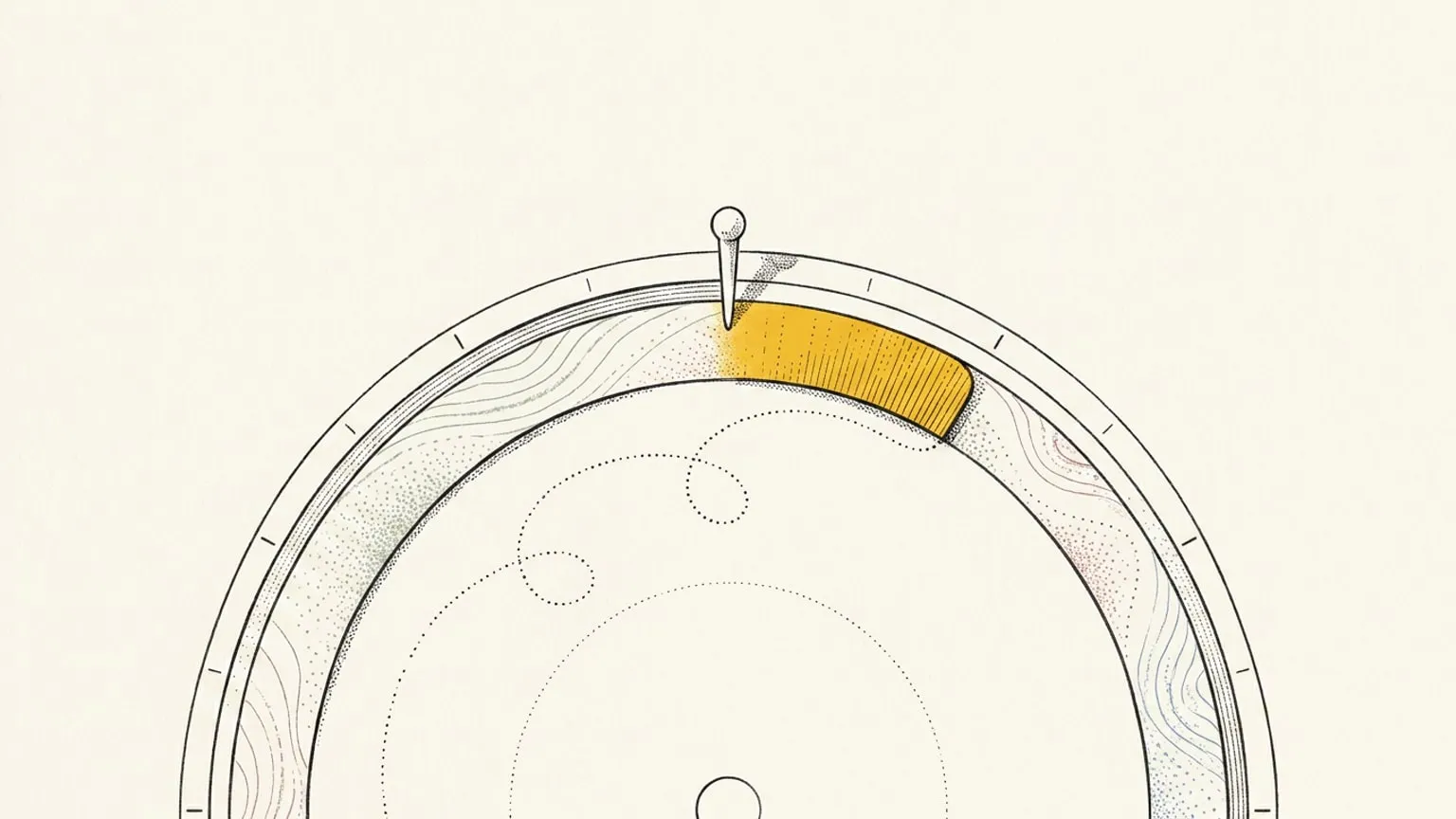
Reassign's focus mode crops your real 24-hour dial to an arc and turns it under a marker pinned at now, so the rotation itself is the countdown.

Every focus timer is a number in a box. Twenty-five minutes, counting down, floating in a window that knows nothing about the rest of your day. It does not know that the block you are in was meant to end at four. It does not know that a meeting starts twenty minutes after that. When it rings, it has no opinion about what happens next, because it has never seen your day.
Meanwhile the dial two tabs over knows all of it.
So focus mode does not add a timer. It takes the dial you already planned and puts you inside it: a screen for the single block you are working through, where the real 24-hour dial, cropped to an arc, turns under a marker pinned at the current time.
The rotation is the countdown
Press F on the block you are working through and the screen changes. The same 24-hour dial, the same events, the same layers you had turned on, except now it is cropped to an arc and it is moving: turning slowly under a marker pinned at the current time.
Time does not travel on this screen. The dial does. Your block slides under the marker as the minutes pass, and when the trailing edge reaches it, the block is over. There is no number to interpret, no bar to fill. The thing you are watching is your actual day, at the actual hour, going past.
Because it is the real dial and not a stylised copy, everything on it still means what it meant. Your energy curve still bends across the arc. The weather is still wrapped round the hours. Hover any of it and you get the same reading you would get on the day view, read-only, so a glance never turns into an edit. And if you would rather work against a bare ring, the calm lens strips the layers and the neighbouring blocks back to just the block you are in.
The panel says the quiet part
Next to the arc, words. Not many.
A kicker tells you where you are: In focus, Recharge, Up next, Done for now, or Ran over. Under it, the block’s title, washed in its area colour and its fill pattern so it looks like itself. Under that, the two numbers that actually matter, set large: how long is left in this focus stretch, and how long is left in the block.
Then the small print that stops you having to leave: which interval you are on, when the next break starts, what is scheduled after this, and a one-line reading of the conditions outside and inside you (the temperature, the weather, where your energy sits). And if the block carries a microtasks checklist, it sits here too, so you tick off each microtask as the arc turns.
In focus, the card takes the block’s area tint and its fill pattern. On a break it goes bare. Above the kicker, one line splits the time into focus and break: Session while a block with a focus rhythm or a live session runs, or Today with the day’s totals when no block runs, once you have a minute of focus behind you. The dial moves with the phase too. It shows about 12 hours when nothing runs, frames the live block in focus, and comes closer on a break or a pause.
A sleep block is rest, not work. The kicker reads Time to rest until the block ends, with no countdown, no Pause and no microtasks. In the first half, Add 15 min starts the sleep 15 minutes later and keeps the wake time. In the second half, I’m awake ends the sleep now. The Today line leaves sleep out.
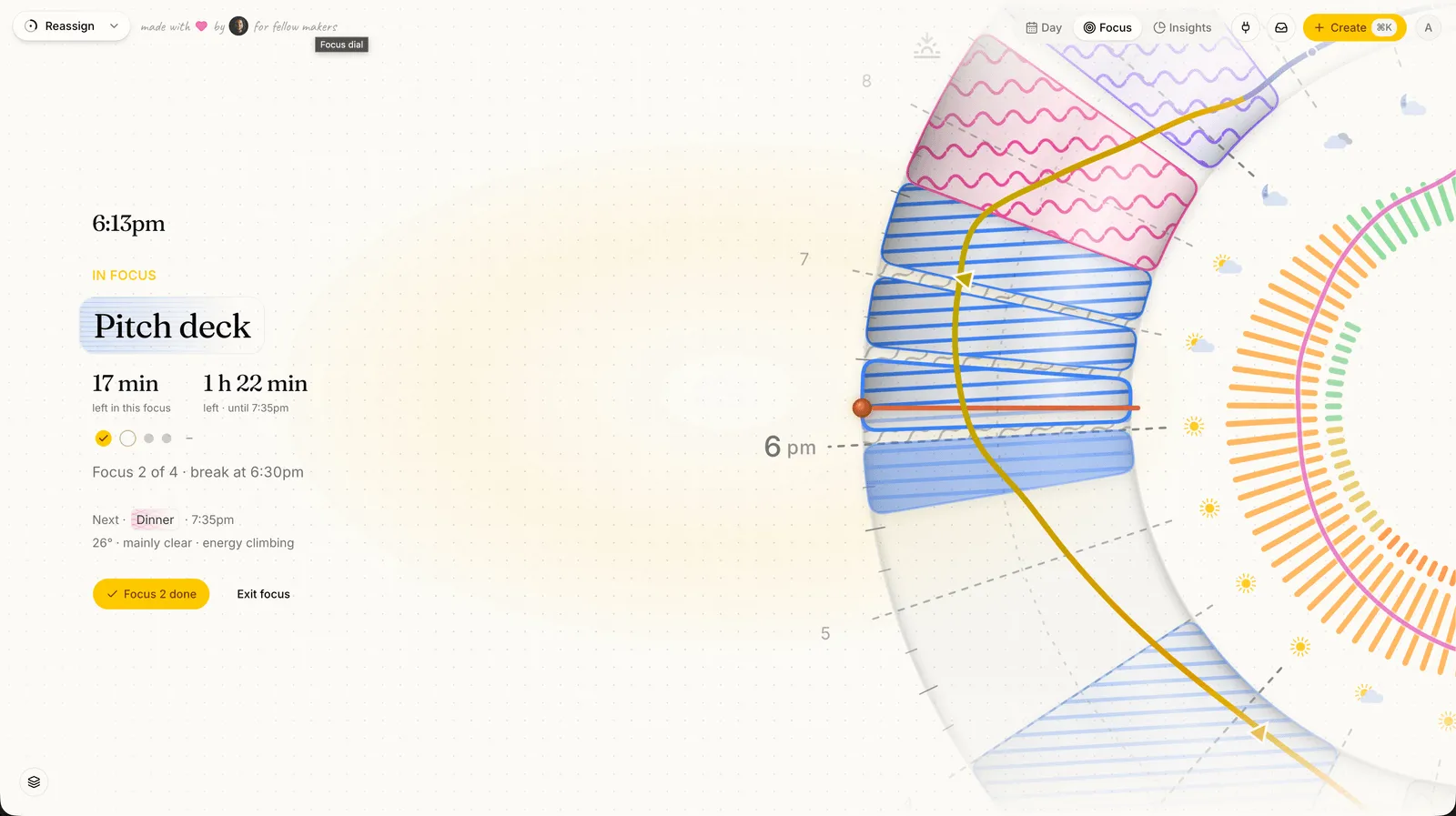
Minutes, never seconds. A clock that ticks down by the second is a clock you watch.
Sound you can choose
The obvious thing to build on a focus screen is atmosphere: a breathing orb, drifting particles, a lo-fi loop. We went looking for evidence that any of it helps and did not find it. What does have measurable effects on attention is taking distraction away.
So the budget went to removal instead. There is no ambient animation beyond the rotation itself and a single micro-pulse on the live interval, which reduced-motion users do not get at all. In-app noise is held back while you are in here. A wake lock keeps the screen from sleeping halfway through a block, and the panel says so plainly, because a screen that stays awake for reasons you cannot see is its own small worry.
The September update adds focus and break bells, microtask completion sounds, and an optional metronome. Use the sound controls to choose what you hear.
Marking an interval is a decision, not a side effect
The circles under the numbers are the block’s focus intervals, one per planned stretch. Tap one and it fills, and the matching bead goes solid on the arc and on your day dial.
Reassign never fills them for you. Time passing is not evidence that you focused, and a tool that assumes otherwise is just generating numbers you cannot trust later. So the count only moves when you say it moved. Tap a future circle and you finish early. Tap + or − and you add or drop an interval as the work turns out to be longer or shorter than you guessed. On a repeating event, all of it applies to today’s occurrence only, never the whole series.
Overrun the block and the kicker flips to Ran over, and the panel offers the three honest options: mark it as planned and move on, take another fifteen minutes, or wrap up. Marking it as planned hands straight off to your day’s reflection, so the block you just lived is already answered for when you look back at the day.
Choose your rhythm before starting
Choose 25/5, 50/10, 90/15, custom focus and break lengths, or Without breaks before starting. Your choice is saved to your account, and live progress updates on the dial and in Focus.
Pause is back. Press Pause during focus and the arc draws a break at now, and every later interval and break moves by its length, so the rhythm keeps its shape instead of squeezing into the time that is left. Continue picks it up. On an automatic break the verb is Skip break instead: it ends the break now, and the next focus starts. Finish the session when you need to stop. The toast that follows has an Undo, so a Finish by mistake costs nothing. A live session remains a real block on your day, with a chip that keeps it in reach away from the Focus screen.
Focus mode does not give you hyperfocus. It protects the block and pulls you out at the end of it. The Llama Life comparison sets that edge beside a timer that keeps counting.
What it adds up to
Because every mark is deliberate, the numbers downstream mean something. Time Insights gained two panels this release: Focus by day, a strip that shows which days you actually put the work in, and Focus by area, which tells you where that focus went. Neither is a streak and neither turns red. Missing a day costs you nothing, by design.
On your phone the same screen becomes a horizon: the arc pinned to the bottom of the display, cresting under the marker, big enough to read from across the desk.
A nudge for the next stretch
Turn on block and break alerts when you want a cue to start, take a break, or return to work. Each has its own switch in Settings → Notifications, and alerts go to every device you turn on. On iPhone and iPad, add Reassign to your Home Screen first.
Why focus mode has no company in it yet
Focus mode is the solitary half, and it is built properly. The other half is company: the most-reported focus strategy adults with ADHD name is not a timer at all, it is someone working quietly alongside you. Sharing your day so a friend, or Claude, can sit with you through a block is on the roadmap, labelled Soon, because it is not here yet.
This is. Focus mode is part of Reassign Pro, on the same entitlement as focus intervals, so if you already have the rhythm you already have this. The short version, with every key, is in the docs. Press F on your next deep-work block.
Frequently asked
- What is focus mode in Reassign?
- Focus mode is a dedicated screen for the one block you are working through. Instead of a timer counting down in a box, it takes your real 24-hour dial, crops it to an arc, and turns it under a marker pinned at the current time. The rotation itself is the countdown. Beside the arc, a focus card in the block's area colour names the block and shows how long is left and what comes next. When the block has a focus rhythm or a live session, one line splits its time into focus and break.
- How do I enter and leave focus mode?
- Press F on the block you want to work through, choose Enter focus from its right-click menu, tap the target icon in its editor card, or use the view toggle. Press Esc or go back to leave. On the way out Reassign shows a short recap of how many intervals you completed and how many minutes you focused.
- Does focus mode need focus intervals set on the block?
- No. A rhythm is optional. Focus mode works on any blocking block: if the block carries a focus and break rhythm you get interval circles to mark off, and if it does not, the whole block reads as one focus stretch. Non-blocking events, like a fast or a reference band, are not eligible.
- Can I pause the focus timer in Reassign?
- Yes. Press Pause during focus on any block, including one from a calendar you do not own, and Continue when you are back. The pause draws as a break at now, so it never counts as focus, and every later interval and break moves by its length. On an automatic break, Skip break takes the place of Pause: it ends the break now and the next focus starts. A sleep block has no Pause. It shows Time to rest, with Add 15 min in its first half and I'm awake after that.
- Are completed intervals counted automatically?
- Never. Reassign only counts an interval when you explicitly mark it, either by tapping its circle in focus mode or through the stepper in your day's reflection. On a repeating event the mark applies to that day only, not the whole series.
- Does focus mode add ambient animation or sounds?
- Focus mode offers focus and break bells, microtask completion sounds, and an optional metronome. Use the sound controls to choose what you hear. There is no ambient soundscape or lo-fi loop.
- What is the difference between focus mode and focus intervals?
- Focus intervals are the rhythm: you set focus and break minutes on a block and Reassign draws them as beads on the dial. Focus mode is the screen you work through that block on, where the dial crops to an arc and turns under a marker pinned at now. Intervals are optional, and focus mode works on any blocking block with or without a rhythm set.
- Is focus mode free?
- Focus mode is part of Reassign Pro, on the same entitlement as focus intervals, so if you already have the rhythm you already have this. There is a 14-day Pro trial and no card is needed to start it.
Block the hour. Then protect it.
Draw the block on a 24-hour dial, then open focus mode with a 25/5, 50/10 or 90/15 rhythm. Break time never counts as focus.
Start your 14-day trial14 days of Pro. No card required. No automatic charge.